Home / Plumbing
Now accepting beta testers Plumbing Made EasyPlumbing business software for water heaters, drains and permits.
Plumbing business software that quotes the water heater, tracks the permit and gets you paid before you leave the driveway. No quote tool that costs more than the quote. No permit number lost in a text. It works in the basement too.
Now accepting beta testers. No card.
Why do plumbers leave the plumbing business software they have?
Summed up from public reviews and owner forums, October 2026.
A missed call is a lost service call
Owners describe missing calls while they are under a sink, and the next plumber gets the job.
The quote tool costs more than the quote
Solo owners call the big platforms overkill and resent paying a monthly fee for one quote.
The app stops where the signal stops
Basements, crawlspaces and mechanical rooms are where the work is, and where the app has to keep working.
The permit lives in email and texts
The permit number, the AHJ and the inspection result are spread across a phone and a paper folder.
How does a plumbing service call go from the phone to paid?
Add or import your plumbing clients
Type in a client or bring your list from a CSV, with the service address, access notes and the equipment you already know.
Quote from your price book
Pick the service, check the price and unit, then text or email the quote from your phone. Your starter prices stay editable.
Keep the equipment and permit on the job
Record the water heater make, model, serial and warranty. Add the permit number, AHJ, inspection date and result.
Finish and get paid
Tick the service call checklist, add photos, send the visit report and the invoice before you leave the driveway.
What plumbing business software is built and in testing?
These features are built and in testing. Plumbing Made Easy is not open yet.
Plumbing price book
21 starter services with an editable price and unit, from a diagnostic or service call to a tankless water heater install, a drain clearing, a repipe and a gas line. Turn any one on or off, rename it and add your own.
Plumbing quote app
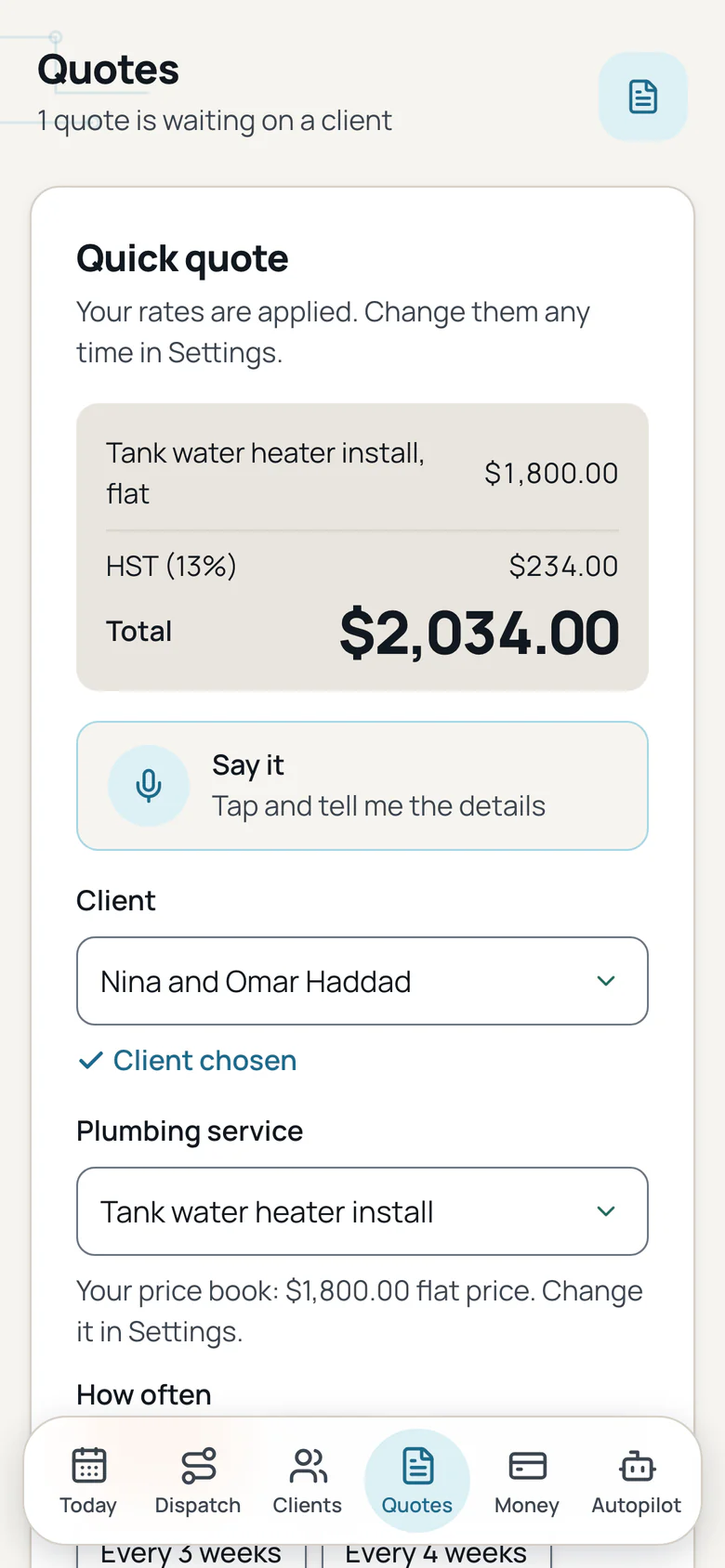
Pick the service, set how often and send a quote by text or email. The quote uses the price in your price book, and the line shows the unit.
Water heater and equipment record
Record the make, model, serial, install date, capacity, fuel type and warranty date with the address. Water heater details include the T and P valve, expansion tank and vent type.
Permit and inspection tracker
Keep the permit number, AHJ, application date, inspection date, result and inspector note on the job, with a reminder date and a gas certificate field.
Service call checklists
Tank water heater replacement, tankless install, drain clearing, sewer camera inspection, fixture replacement and backflow test. Each service starts with its own checklist.
Visit report fields
The visit report can show the equipment at the address and the permit and inspection line, next to the work you ticked and the photos from the visit.
Branded invoices with status
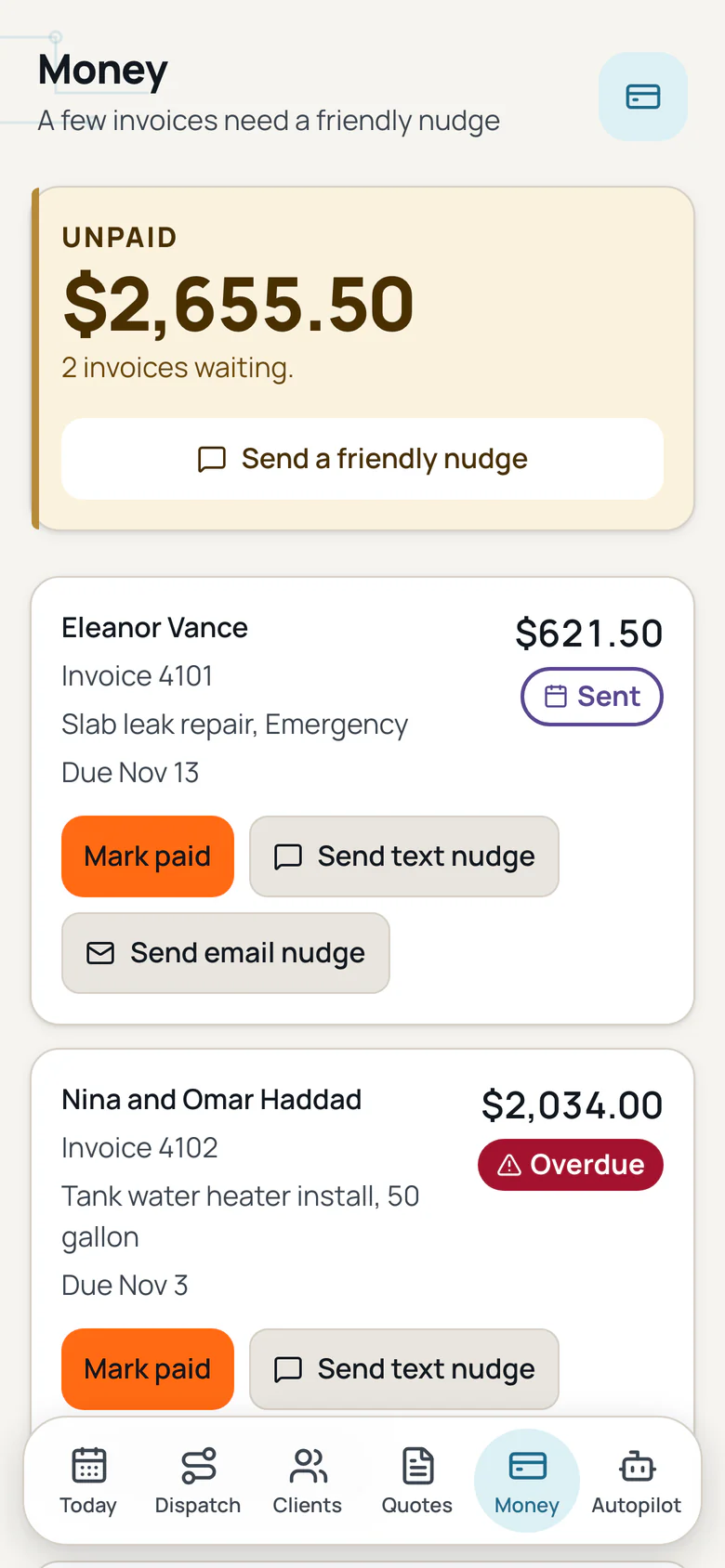
Your logo and colour on every invoice, with sent, viewed and paid shown for each one.
Interac e-Transfer
Clients pay by Interac e-Transfer, and you see when they open the invoice.
Tax for your province
Tax is added from your province and shown on every quote and invoice.
Due dates and late fees
Set an invoice due on receipt or in 7, 14 or 30 days, and turn on a late fee if you want one.
Payment reminders
Friendly reminders for unpaid invoices, on to start and off with one tap.
Monday owner email
One short email on Monday with what you earned, what is unpaid, this week and quiet clients.
Plumbing booking page
Share one link so a homeowner or property manager picks a service call time and sends the request. The business confirms first, and there is no payment up front.
Review requests
One tap after a visit to ask a client for a review. Each client is asked once at most.
Works offline, then syncs
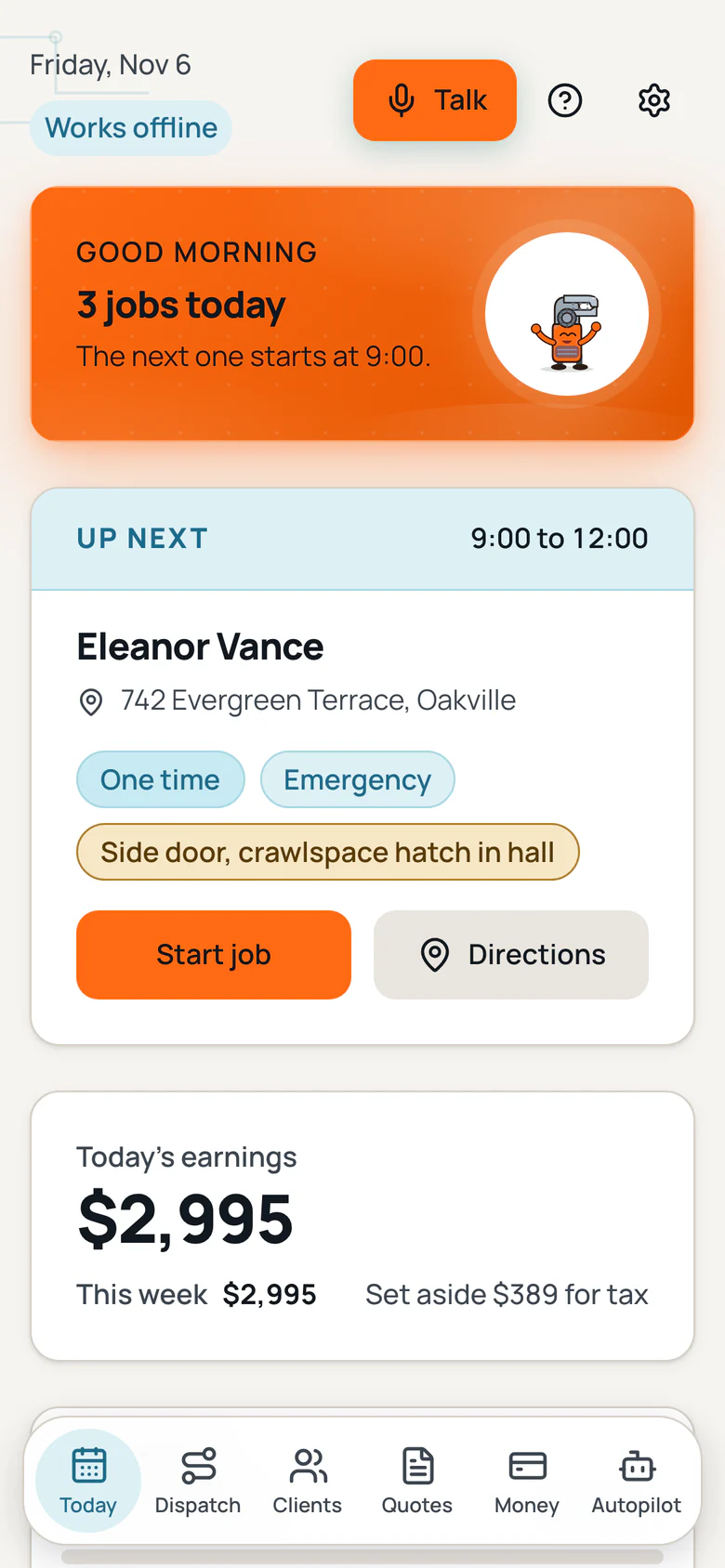
Open the app once and it keeps running with no bars. Equipment details, permit notes, photos and job ticks save on the phone and sync when you are back online.
Say it, once per form
Tap Say it, say the details, and the form fills. Check each field and tap Save. Long notes keep their own mic.
Setup checklist
A short checklist on Today takes you from sign up to your first client and first quote.
Drafts save as you type
A closed tab or a dead battery does not lose your work. The draft waits on the phone.
Delete a client
Remove a client and their visits, quotes, invoices and photos in one clear step.
Calendar feed
Subscribe to your visits in Apple, Google or Outlook calendar, and add any visit with one tap.
Export anytime
Download your clients, visits, quotes and invoices whenever you want, free.
Support chat
Ask in the app and a real person replies within 1 business day. Your ticket and the reply stay in the app.
A plumbing quote app that starts with the owner words
Public reviews and owner forums, read in November 2026. Each card starts with the words an owner used, then the feature and the change.
"Being on a job and missing a call is just part of the work."
The app: The booking page takes a request while you are under the sink.
The change: The client picks a time and sends the details. You confirm before anything is booked.
"you will resent paying $90 or more a month for a quote tool."
The app: The price book is part of the app, not a separate quote tool.
The change: Pick the service, check your price and send the quote. The starter prices are editable.
"The app needs to cache data locally so that it can function with limited or no connectivity."
The app: The app works offline after it opens once on the phone.
The change: Ticks, notes, photos and tool records save on the phone and sync when you are back online.
"It should be easier to do basic things like create and email a quote to a past client."
The app: A quick quote starts with the client and the service.
The change: Pick the client, pick the service from your price book, then text or email the quote.
"Every time a new feature is released they add a price tag to it."
The app: The daily tools stay in every plan.
The change: Quotes, visits, invoices, reminders, the price book and the two plumbing tools are not a separate add on.
"You cannot see an entire month view from the app."
The app: The calendar feed shows your visits in the calendar you already use.
The change: Subscribe in Apple, Google or Outlook calendar and add any visit with one tap.
"Where is the permit number?"
The app: The permit and inspection tracker keeps it on the job.
The change: Record the permit number, AHJ, inspection date and result, with a reminder date.
Water heater record and plumbing permit tracker
Two tools built for the work that eats the day: the big-ticket water heater and the permit that has to be on the job.
Water heater and equipment record
Make, model, serial, install date, capacity, fuel type and warranty date, kept with the address. The next service call starts with the facts.
Permit and inspection tracker
Permit number, AHJ, status, application date, inspection date, result, inspector note, reminder date and a gas certificate field, kept on the job.
Price book with your prices
21 starter services with an editable price and unit. Add your own, rename one, turn one off. Nothing is locked.
What do other plumbing apps charge more for?
Public pricing and owner reviews read in November 2026. We do not name other apps.
Per user charges
Some apps add a fee for every person on the account.
Extra charges after sign up
Some apps bill extras separately, without showing the price first.
Daily tools on higher plans
Quotes, client records, reminders and the permit record sit on pricier plans in other apps.
A quote tool sold separately
Some owners pay for a scheduling app and a quote tool, then copy the same details into both.
What do we promise plumbing owners?
No contracts to escape, no surprise fees, and your data stays yours.
Your plumbing quote price holds
The price on your signed plumbing quote stays put for the service you listed, so a water heater or repipe job never grows a surprise at the invoice.
The core tools stay in the base plan
Quotes, the price book, equipment records, permit tracking, visit reports and invoices are in the plan you start on and are never moved to a higher tier. Add ons show their price first.
A real person, any time
Ask in the app or reply to any email and a real person answers. Want to talk? Book a call. We build what owners ask for.
Your plumbing records leave with you
Download your clients, jobs, equipment records, photos and invoices whenever you want, at no cost.
A real person within one business day
Ask a question from the service call and a real person answers within one business day. The ticket and the reply stay with the equipment and permit.
Works on site with no signal
Open the app once and it keeps running with no bars. Job ticks, equipment details, permit notes and photos save on the phone and sync when you are back online.
What do plumbers ask about plumbing scheduling software?
What is a good plumbing business software for a small shop?
A good plumbing business software keeps the daily work in one place: clients, service calls, quotes, invoices and payments. Plumbing Made Easy adds a price book you control, a water heater and equipment record, and a permit and inspection tracker on the job.
Is this a plumbing quote app?
Yes. Pick the service from your price book, check the price and unit, set how often, then text or email the quote from your phone. The starter prices are editable defaults.
Does it record the water heater and the warranty?
Yes. Record the make, model, serial, install date, capacity, fuel type and warranty date with the address. For a water heater you can also record the T and P valve, expansion tank, vent type, first hour rating and temperature setting.
Can I track plumbing permits and inspections?
Yes. The permit tracker keeps the permit number, AHJ, status, application date, inspection date, result, inspector note and reminder date on the job. There is a gas certificate field and an expiry date.
What plumbing checklists come with the app?
Tank water heater replacement, tankless water heater install, drain clearing, sewer camera inspection, fixture replacement and backflow test. A new quote starts with the checklist for the service you picked.
Does it work offline in a basement or crawlspace?
Yes. Once the app has opened on your phone, it works with no signal, even if you close and reopen it. Changes save on the phone and sync when you are back online.
Join the plumbing waitlist for the launch.
We will email you when Plumbing Made Easy opens. No card.
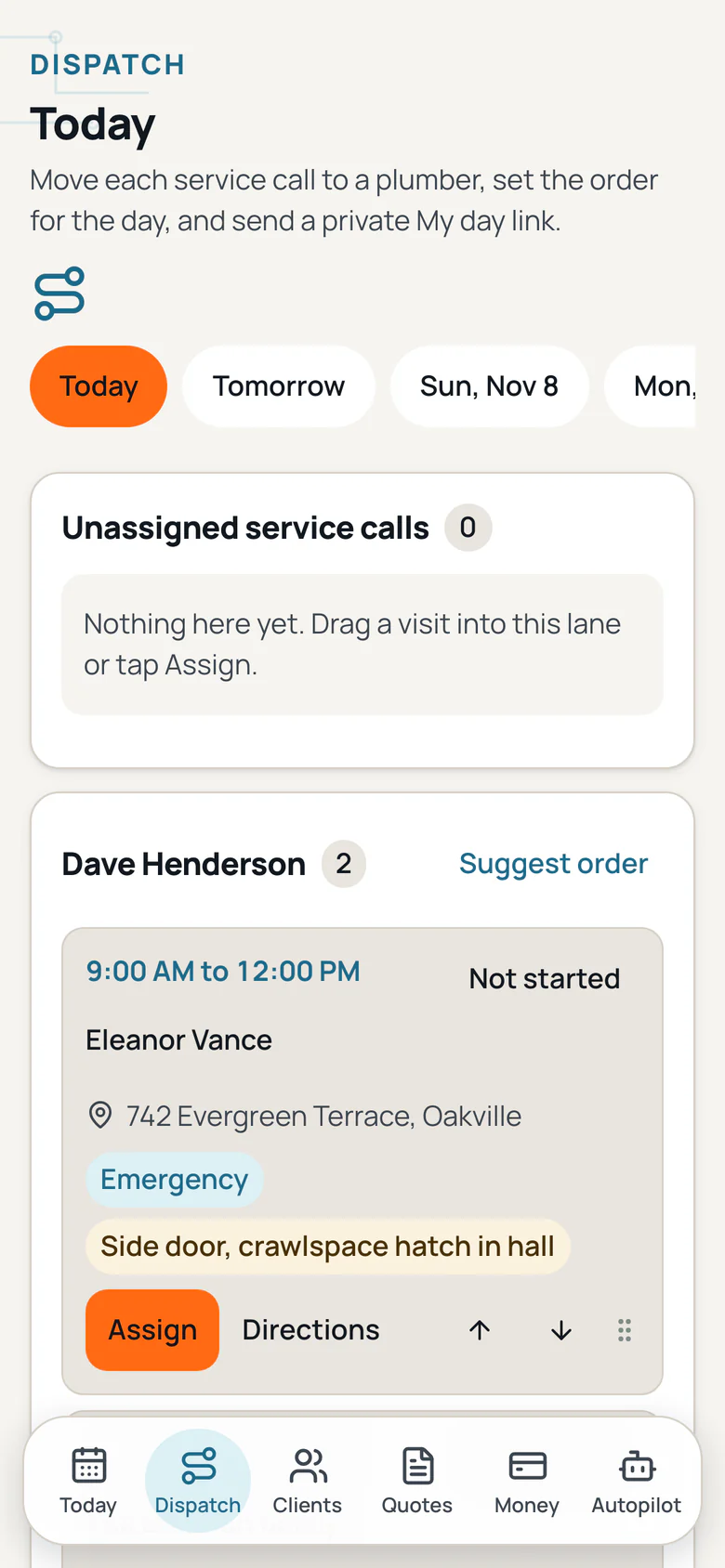
Plumbing Made Easy screens.
The today, quote, dispatch and money screens from the app, each in a full phone frame. Swipe to see every screen.
Screen 1 of 4