Home / HVAC
Now accepting beta testers HVAC Made EasyHVAC business software for tune-ups, installs and refrigerant.
HVAC business software keeps every unit, refrigerant log, tune-up and invoice on one phone, for one truck to five techs. The work is hard enough. You should not pay per tech, pay extra for maintenance plans, or lose the app in the basement by the furnace.
Cooling blue, heating red, no drama. Now accepting beta testers. No card.
Why do HVAC owners leave the HVAC business software they have?
Summed up from public reviews and owner forums, October 2026.
Built for a big shop
Owners describe the big platforms as too heavy and complicated for a small company, with half the features out of reach.
A price for every tech
A per tech charge turns the second van into a monthly bill before the work arrives.
Pen and paper on the truck
The client list, the tune-up sheet and the refrigerant note live in three places, and none of them export.
The app stops where the signal stops
Basements, mechanical rooms and rooftops are where the work is, and where the app has to keep working.
Maintenance agreements locked away
The plan that turns one repair into two tune-ups sits in the most expensive tier in other apps.
How does an HVAC service call go from the phone to paid?
Add or import your HVAC clients
Type in a homeowner or property manager, or bring the list from a CSV with the service address, gate notes and the equipment already on site.
Quote the repair or install
Pick the service from your price book, check the price and unit, and price an install by the ton. Then text or email the quote from your phone.
Book the seasonal tune-up
Keep a maintenance agreement, book the spring cooling and fall heating visits, and record the equipment make, model, serial and filter size with the address.
Finish and get paid
Tick the service call checklist, log any refrigerant with the certification number, send the visit report and the invoice before you leave the driveway.
What HVAC business software is built and in testing?
These features are built and in testing. HVAC Made Easy is not open yet.
HVAC price book
18 starter services with an editable price and unit, from a diagnostic or service call to a flat rate repair, a tune-up, an install priced by the ton and an annual maintenance plan. Turn any one on or off, rename it and add your own.
HVAC quote app
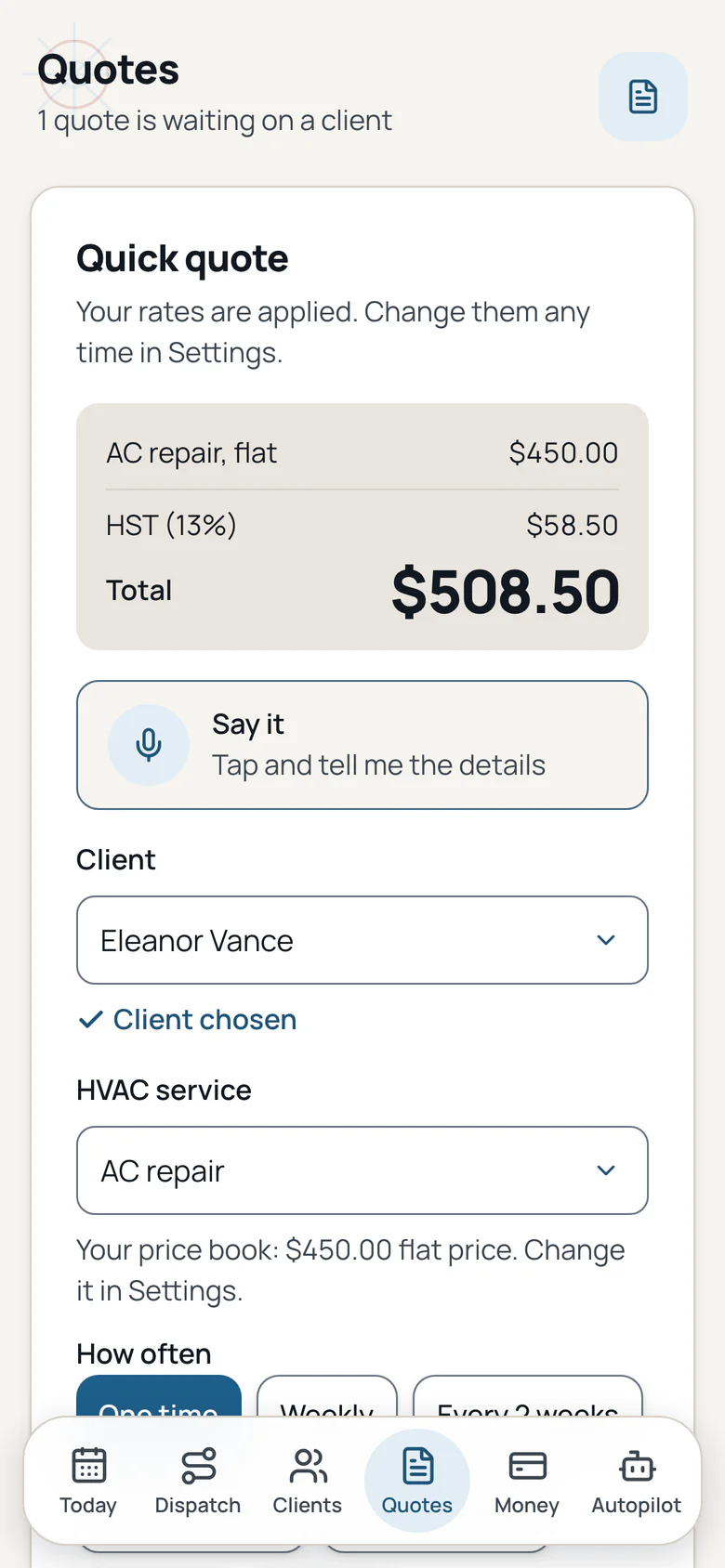
Pick the service, set how often and send a quote by text or email. The quote uses the price in your price book, and an install quote multiplies the per ton price by the tons you enter.
Maintenance agreements
Keep a yearly plan with a price, visit count and renewal date. The app books the spring cooling and fall heating tune-ups as normal visits, and the visit reminders you already use keep the client ready.
Equipment history per address
Record the make, model, serial, install date, capacity, refrigerant type, factory charge, filter size and warranty date with the address. The next service call starts with the facts.
Refrigerant log
Log the refrigerant type, pounds added, pounds recovered, cylinder ID, certification type and number, leak notes and ambient temperature. The log stays with the address as service history and billing proof.
Seasonal tune-up checklists
Spring cooling tune-up, fall heating tune-up, heat pump tune-up, install commissioning, no cool, no heat and a maintenance agreement visit. Each service starts with its own checklist.
Visit report fields
The visit report can show the equipment at the address and the refrigerant line, next to the work you ticked and the photos from the visit.
Branded invoices with status
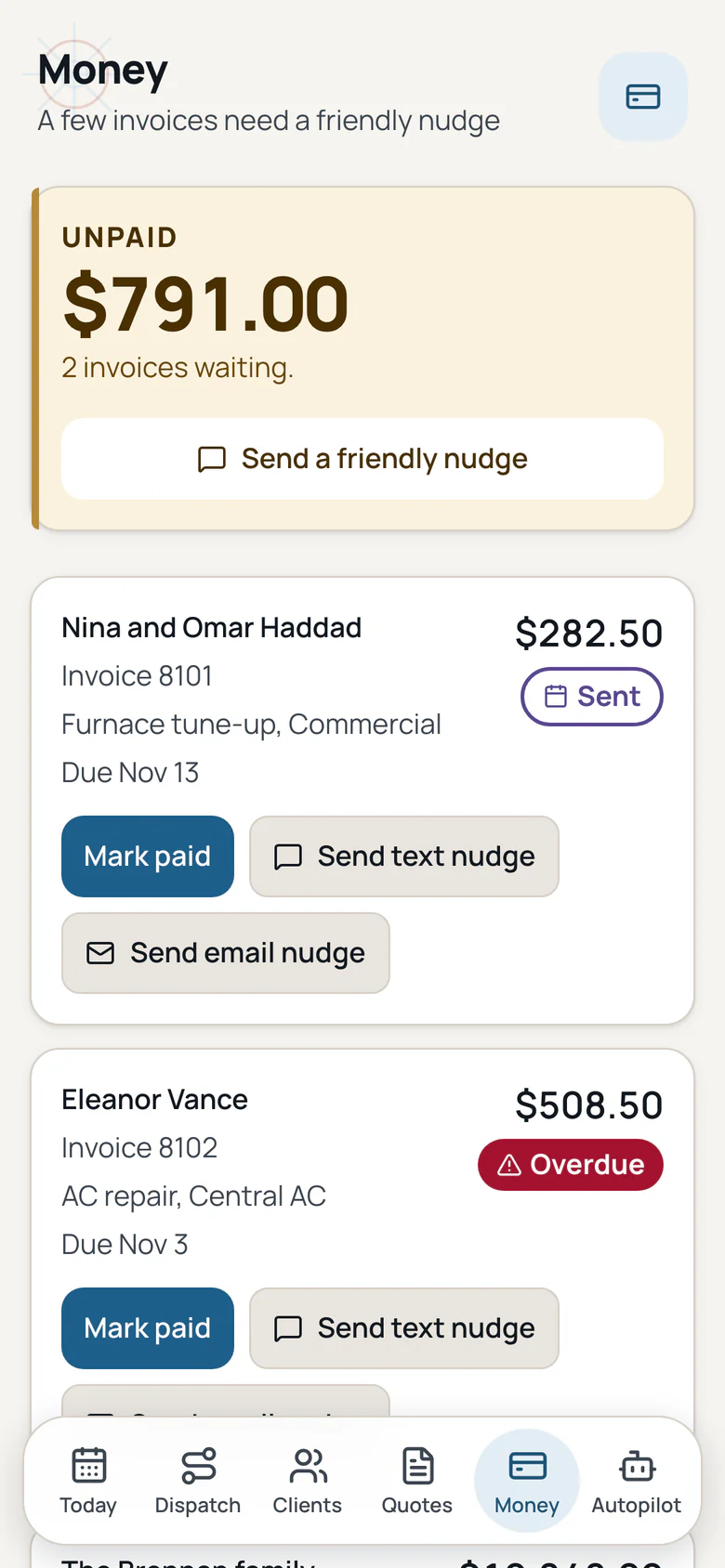
Your logo and colour on every invoice, with sent, viewed and paid shown for each one.
Interac e-Transfer
Clients pay by Interac e-Transfer, and you see when they open the invoice.
Tax for your province
Tax is added from your province and shown on every quote and invoice.
One invoice per month
Bill every visit this month for a weekly or every 2 weeks client on one invoice.
Due dates and late fees
Set an invoice due on receipt or in 7, 14 or 30 days, and turn on a late fee if you want one.
Payment reminders
Friendly reminders for unpaid invoices, on to start and off with one tap.
Monday owner email
One short email on Monday with what you earned, what is unpaid, this week and quiet clients.
HVAC booking page
Share one link so a homeowner or property manager asks for a tune-up or service call. The business confirms the time first, and there is no payment up front.
Review requests
One tap after a visit to ask a client for a review. Each client is asked once at most.
Works offline, then syncs
Open the app once and it keeps running with no bars. Tune-up ticks, equipment details, refrigerant notes and photos save on the phone and sync when you are back online.
Say it, once per form
Tap Say it, say the details, and the form fills. Check each field and tap Save. Long notes keep their own mic.
Setup checklist
A short checklist on Today takes you from sign up to your first client and first quote.
Drafts save as you type
A closed tab or a dead battery does not lose your work. The draft waits on the phone.
Delete a client
Remove a client and their visits, quotes, invoices and photos in one clear step.
Calendar feed
Subscribe to your visits in Apple, Google or Outlook calendar, and add any visit with one tap.
Dispatch add on
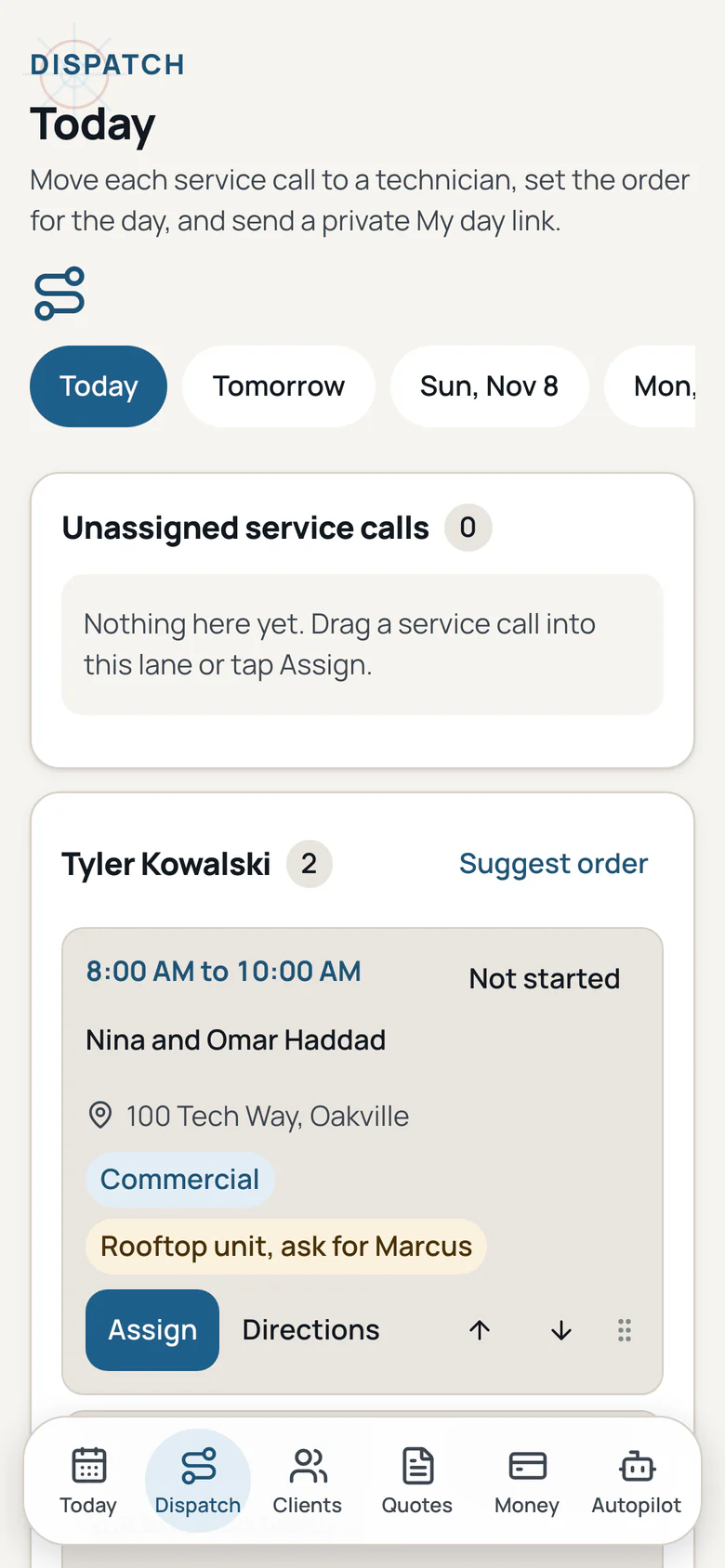
A board for your technicians, route order for each day, live status and a private My day link for each person.
Export anytime
Download your clients, visits, quotes and invoices whenever you want, free.
Support chat
Ask in the app and a real person replies within 1 business day. Your ticket and the reply stay in the app.
An HVAC invoicing app that starts with the owner words
Public reviews and owner forums, read in November 2026. Each card starts with the words an owner used, then the feature and the change. We do not name other apps.
"The big platforms are too cumbersome and complicated for our small company."
The app: A price book and a quote that start with the work.
The change: Pick the service, check your price and send the quote. The starter prices are editable.
"I am paying $259.00 per managed tech."
The app: One price, not one per technician.
The change: The plans cover the owner and a small crew. There is no per person charge on the plans shown here.
"We currently operate entirely on pen and paper."
The app: One place for the list, the visit and the invoice.
The change: Add the client, book the visit, tick the checklist and invoice from the same phone.
"Running a one man HVAC operation and trying to figure out the software situation."
The app: A small HVAC business app that fits one van.
The change: The daily tools are in every plan. Add Dispatch only when the second van arrives.
"42 taps. Exhausting!"
The app: A quote in a few taps.
The change: Pick the client, pick the service, check the price and send. Drafts save as you type.
"It needs constant connectivity to function."
The app: The app works offline after it opens once on the phone.
The change: Ticks, notes, photos, equipment and refrigerant records save on the phone and sync when you are back online.
"Images fail to upload and there is no way to manually retry."
The app: Photos queue on the phone.
The change: A photo saved offline uploads when the signal returns, and it stays on the visit.
"Where is the equipment history?"
The app: Equipment history per address.
The change: Save the make, model, serial, filter size and warranty with the address, then see it on the next visit.
"The maintenance plan is in the top tier."
The app: Maintenance agreements are a tool you can switch on.
The change: Keep the yearly plan, book the seasonal tune-ups and invoice the visit the way you already do.
Maintenance agreement software and the seasonal tune-up
Two tools built for the work that comes back every year: the plan that books the tune-up, and the equipment record that makes the next call faster.
Maintenance agreements
A yearly plan with a price, visit count and renewal date. Save it and the spring cooling and fall heating tune-ups are booked as normal visits. The visit reminders you already use follow up with the client. Switch the tool on or off for the business.
Equipment history per address
Make, model, serial, install date, capacity, refrigerant type, factory charge, filter size and warranty date, kept with the address. The next service call starts with the facts.
Refrigerant log app
The refrigerant type, pounds added, pounds recovered, cylinder ID, certification type and number, leak notes and ambient temperature, kept with the address as service history and billing proof.
Equipment history and a refrigerant log app per address
The tune-up sheet, the refrigerant note and the invoice stop living in three places. The panel sits on the service call, next to the checklist and the photos.
Furnace tune up checklist
Filter, heat exchanger, burners, flame sensor, gas supply and manifold pressure, combustion readings, flue draft, blower amps and the safety switches. The spring cooling list covers the coil, pressures, superheat and subcool, delta T, capacitor and condensate.
Install by tonnage
Price a central AC replacement or a heat pump install by the ton. The quote multiplies your per ton price by the tons you enter, and the line shows the unit.
Compliance without the scare
Keep the certification type and number with any refrigerant line. The app does not pretend every home repair is a required federal record, and a missing entry never blocks the work.
What do other HVAC apps charge more for?
Public pricing and owner reviews read in November 2026. We do not name other apps.
Per user charges
Some apps add a fee for every person on the account.
Extra charges after sign up
Some apps bill extras separately, without showing the price first.
Daily tools on higher plans
Quotes, client records, reminders and maintenance agreements sit on pricier plans in other apps.
A refrigerant log sold separately
Some owners keep the refrigerant note on paper and copy it into a second tool.
A price for the second van
A per tech charge arrives before the second van earns its first invoice.
HVAC scheduling software and the dispatch app
Recurring visits stay on their own schedule. The calendar feed works in the calendar you already use. Dispatch is an optional add on when the second van arrives.
HVAC scheduling software
One time, weekly, every 2 weeks, every 3 or 4 weeks or monthly. Skip one visit without breaking the rest, and see the week on Today.
Calendar feed
Subscribe in Apple, Google or Outlook calendar and add any visit with one tap.
Dispatch add on
A board for the technicians, route order for each day, live status and a private My day link for each person.
What do we promise HVAC owners?
No contracts to escape, no surprise fees, and your data stays yours.
Your HVAC quote price holds
The price on your signed HVAC quote stays put for the service you listed, so a tune-up or install never grows a surprise at the invoice.
The core tools stay in the base plan
Quotes, the price book, maintenance agreements, equipment history, the refrigerant log and invoices are in the plan you start on and are never moved to a higher tier. Add ons show their price first.
A real person, any time
Ask in the app or reply to any email and a real person answers. Want to talk? Book a call. We build what owners ask for.
Your HVAC records leave with you
Download your clients, jobs, agreements, equipment and refrigerant records, photos and invoices whenever you want, at no cost.
A real person within one business day
Ask a question from the service call and a real person answers within one business day. The ticket and the reply stay with the equipment record.
Works on site with no signal
Open the app once and it keeps running with no bars. Tune-up ticks, equipment details, refrigerant notes and photos save on the phone and sync when you are back online.
What do HVAC owners ask about small HVAC business software?
What is a good HVAC business software for a small shop?
A good HVAC business software keeps the daily work in one place: clients, service calls, quotes, invoices and payments. HVAC Made Easy adds a price book you control, maintenance agreements with seasonal tune-ups, equipment history per address and a refrigerant log.
Is this an HVAC invoicing app?
Yes. Send a branded HVAC invoice with your logo and colour, see sent, viewed and paid, and let the client pay by Interac e-Transfer. Each quote gets its own link the client can open and accept.
Does it handle HVAC maintenance agreement software and seasonal tune-ups?
Yes. Keep a yearly plan with a price, visit count and renewal date. The app books the spring cooling and fall heating tune-ups as normal visits, and the visit reminders you already use follow up with the client.
Does it keep equipment history per address?
Yes. Record the make, model, serial, install date, capacity, refrigerant type, factory charge, filter size and warranty date with the address. The next service call starts with the same facts.
Does it include a refrigerant log app?
Yes. Log the refrigerant type, pounds added, pounds recovered, cylinder ID, certification type and number, leak notes and ambient temperature. The log stays with the address, and a missing entry never blocks a repair.
What furnace tune up checklist comes with the app?
The fall heating tune-up covers the filter, heat exchanger, burners, flame sensor, gas pressure, combustion readings, flue draft, blower amps and the safety switches. The spring cooling tune-up covers the condenser coil, pressures, superheat and subcool, delta T, capacitor, amp draw and condensate.
Join the HVAC waitlist for the launch.
We will email you when HVAC Made Easy opens. No card.
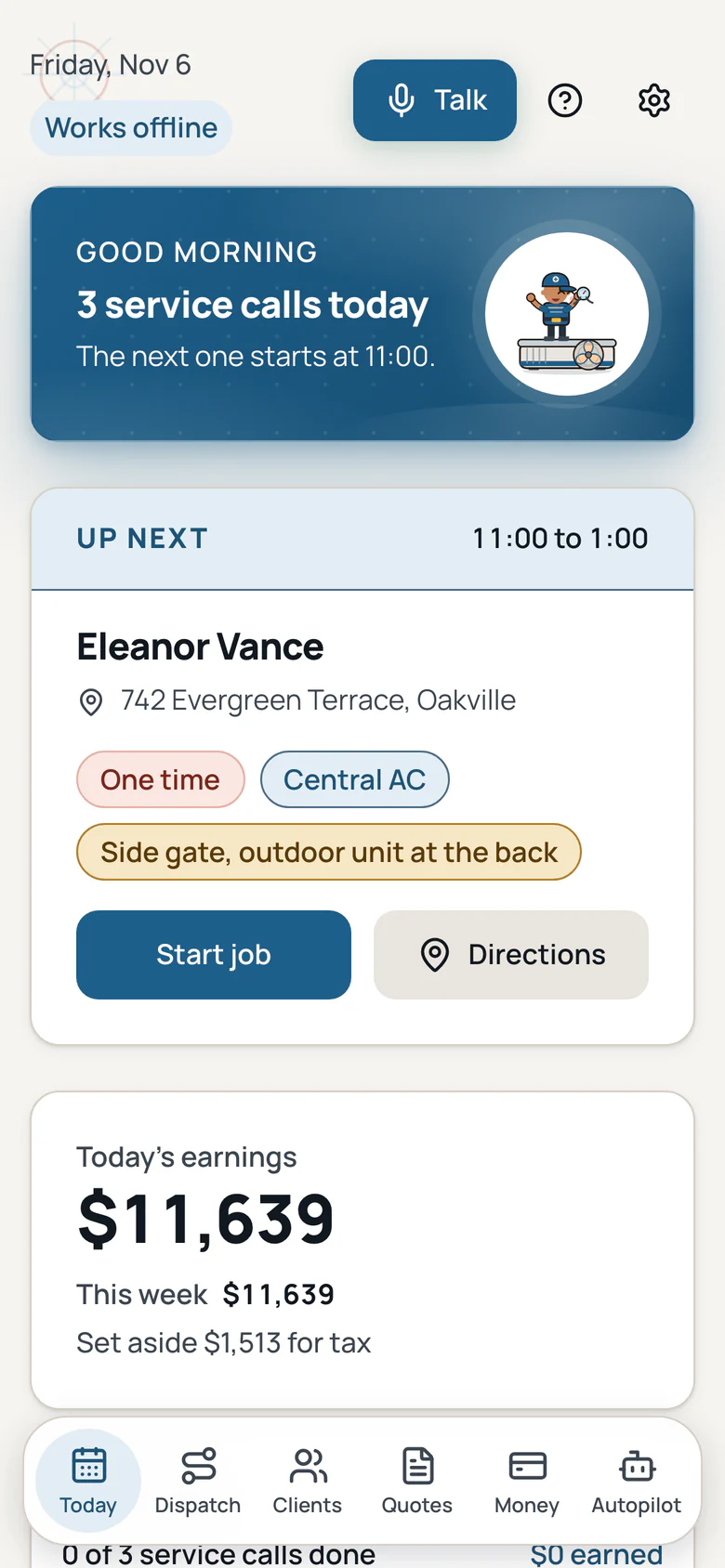
HVAC Made Easy screens.
The today, quote, dispatch and money screens from the app, each in a full phone frame. Swipe to see every screen.
Screen 1 of 4