Home / Handyman
Now accepting beta testers Handyman Made EasyHandyman business software that quotes the small job in two minutes.
Handyman business software quotes the small job in two minutes, captures the parts and gets paid before the next call. Hourly labour, a minimum charge, a trip fee, a flat task price and a materials markup sit on one screen, with a task list that keeps the proof. It is in development, and the waitlist hears first when the Android test opens.
Now accepting beta testers. No card.
Why do handymen leave the apps they have?
Summed up from public reviews and owner forums, October 2026.
Parts never reach the invoice
A receipt stays in the truck and the margin quietly walks away.
The scope was never written down
A verbal yes on site turns into a negotiation when the bill arrives.
A minimum and a trip fee left out
A twenty minute job still has a drive, a setup and a payment.
Every task in a different place
A text, a notebook and a camera roll, with no proof of what was finished.
How does a small job go from first call to paid?
Quote the small job in two minutes
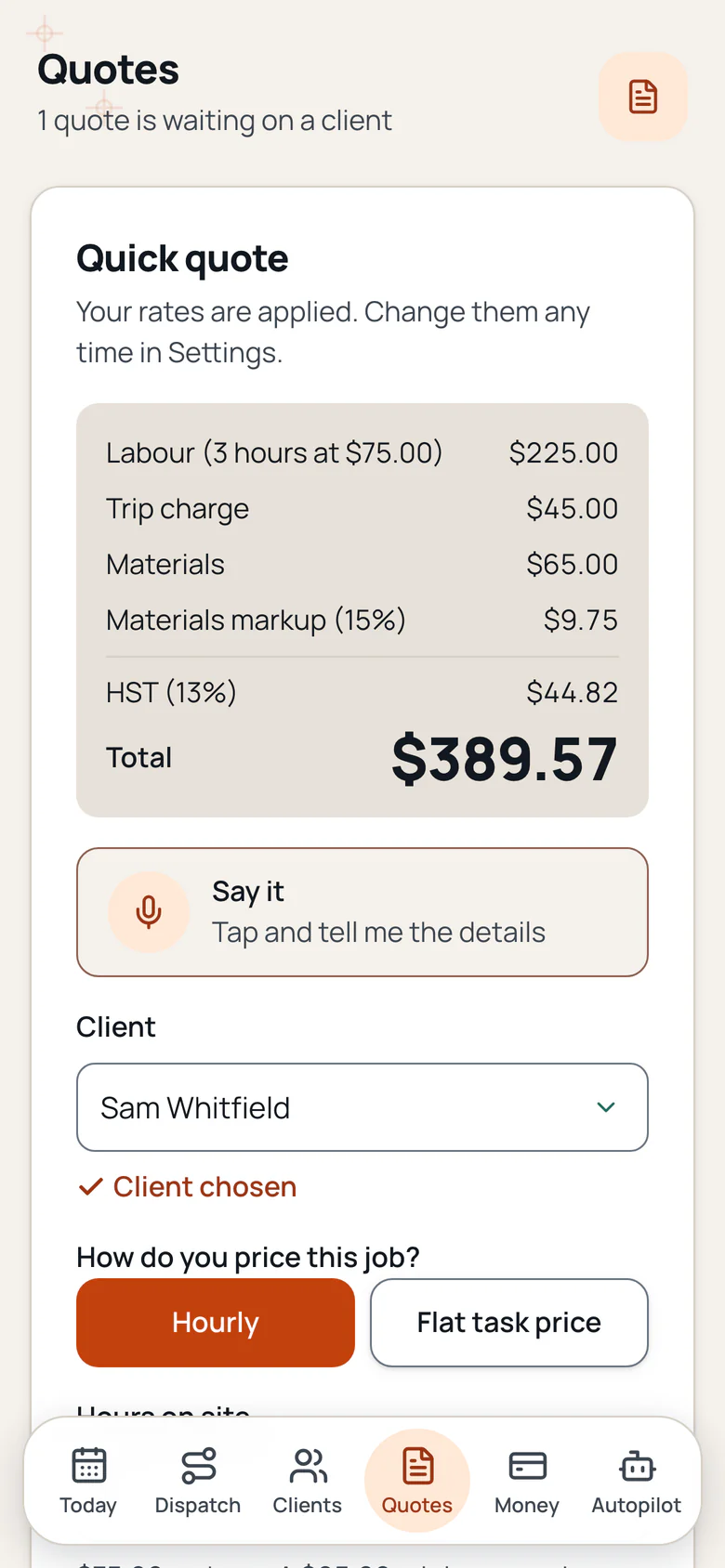
Pick a client, choose hourly or a flat task, add the hours, the materials and the markup. The app applies your minimum and trip charge and shows the total before you send it.
Build the task list on site
Add every task, photo before and after each one, tick it off and note anything that changed. A trade template gets you started.
Collect the sign off and the payment
The client signs the finished list on your phone, the visit report carries the proof and the invoice goes out before the next call.
What do handymen say, and what changes in the app?
Public posts from owners, quoted in their own words. The feature beside each one is built into Handyman Made Easy. The app is not open yet.
An owner on r/handyman
Constantly forgetting to bill for materials and it's killing my margins
What the app does: Every receipt stays on the job, with the vendor, the amount and your markup. The parts line goes on the invoice.
The change: The store run stops being a donation.
An owner on r/handyman
Just lost out on ~$300 because I forgot to bill for materials on a job last week
What the app does: A receipt photo and an amount are two taps, and the billable total updates before you invoice.
The change: The margin stays in the business.
An owner on r/handyman
Got burned twice last year on 'while you're here' work. Verbal OK on site, did the extra work, then the final invoice became a negotiation because nobody remembered agreeing to a number.
What the app does: A change order keeps the scope, a photo, the price and the schedule change, and the client approves it with a signature.
The change: The extra work is agreed before the tools come out.
An owner on r/handyman
invoicing, tracking what I spent on materials per job, and keeping receipts organized for tax time is honestly the most stressful part of the whole thing. I keep receipts in an envelope in my truck
What the app does: The receipt photo, the job cost and the invoice live on one record, and the export takes the year with you.
The change: The envelope in the truck can retire.
What is in Handyman Made Easy?
These features are built and in testing. Handyman Made Easy is not open yet.
Quick quote with hourly plus materials
Hourly labour with your own rate, a minimum charge, a trip fee and a materials markup. The app shows the real price after the minimum, not a number that ignores the drive.
Flat task price list
TV mount, faucet, toilet, drywall patch, grab bar, gutter clean, furniture assembly and the rest. Turn any task on or off, rename it and set your own flat price.
Multi task job list
Add every task to one visit, set the order, note the hidden damage and flag the work that needs a licensed trade.
Before and after photo on each task
Every task keeps its own before and after photo, so the proof is attached to the work it belongs to.
Client sign off
The client signs the finished list with a typed name or a drawn signature, and the report keeps the date and the signature.
Materials and receipts
Photo a receipt, keep the vendor and the amount on the job and add your markup. The parts line lands on the same invoice.
Change orders with a signature
Add scope, a photo, a price and any schedule change, then the client approves with a signature before the extra work starts.
Visit report with the task list
Send a branded report with the tasks that were done, the photos and the notes you choose to share.
Invoice and payment reminders
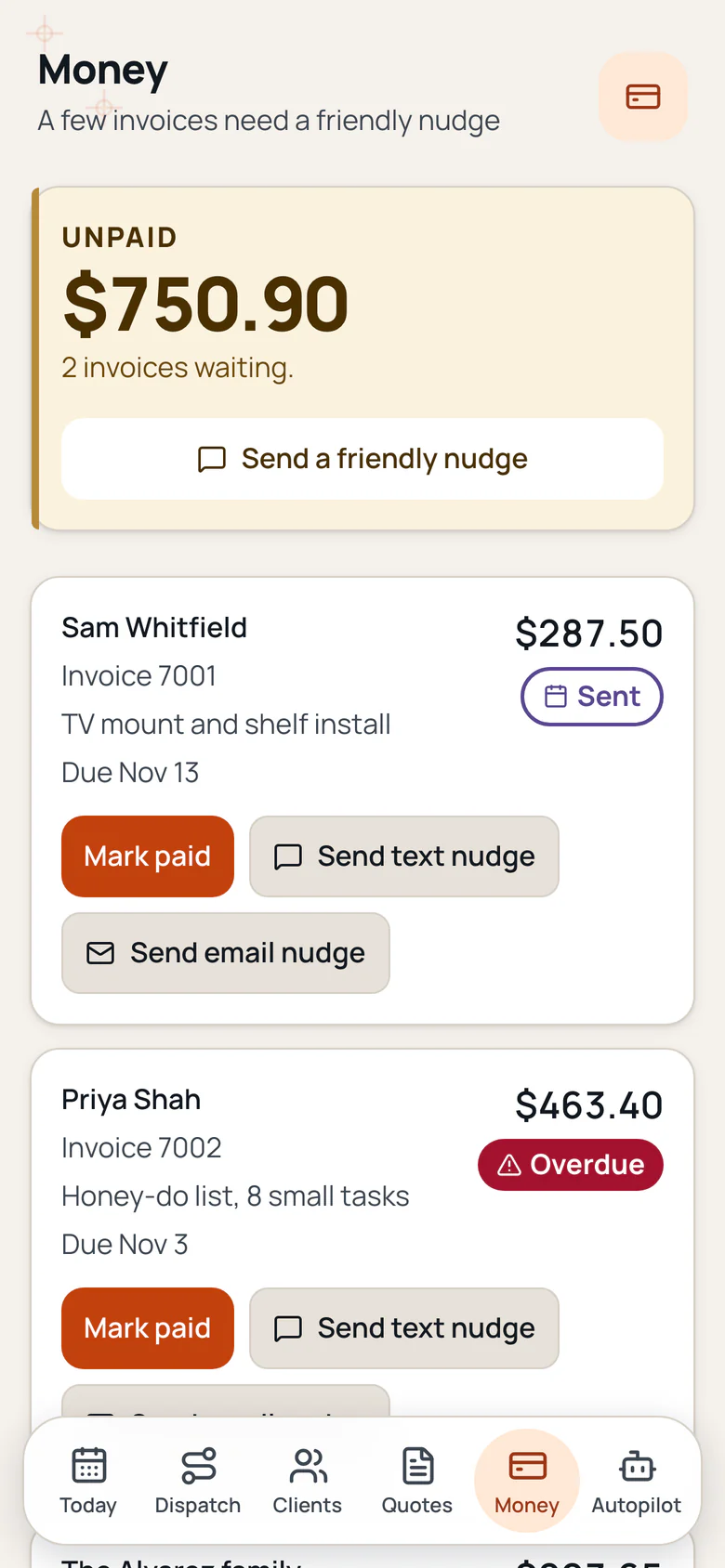
Send a branded invoice with tax, watch sent, viewed and paid, and let a friendly reminder follow up on the unpaid ones.
Licence cap warning
Set your state and the unlicensed work cap. The quote warns you before the total crosses it, and the job list flags regulated work.
Works offline, then syncs
Open the app once and it keeps running with no bars. Tasks, photos, notes and receipts save on the phone and sync when you are back online.
Export anytime
Download your clients, jobs, quotes, invoices and photos whenever you want, free.
Support chat
Ask in the app and a real person replies within 1 business day. Your ticket and the reply stay in the app.
Handyman quote, materials markup and job tracking.
Handyman quote app
Hourly labour with a minimum and a trip fee, a flat task price and materials with your markup, all on one quote.
Materials markup app
A receipt photo, the vendor, the amount and the markup on the job, then the parts line goes on the invoice.
Handyman job tracking
Every task, its photo and its status on one visit, with a client sign off when the list is done.
Handyman invoicing app
A branded invoice with tax, a payment reminder and a client link that opens on a phone.
What do we promise handyman owners?
No contracts to escape, no surprise fees, and your data stays yours.
Your quote price holds
The price on the quote you send stays put for the tasks you listed, so a small job never grows a surprise at the invoice.
The core tools stay in the base plan
Quick quotes, task lists, photo proof, sign off and invoices are in the plan you start on and are never moved to a higher tier. Add ons show their price before you turn them on.
A real person, any time
Ask in the app or reply to any email and a real person answers. Want to talk? Book a call. We build what owners ask for.
Your job records leave with you
Download your clients, jobs, quotes, invoices and photos whenever you want, at no cost.
A real person within one business day
Support chat sits inside the app and a real person answers within one business day. The ticket and the reply stay on the job.
Works on site with no signal
Open the app once and it keeps running with no bars. Tasks, photos, notes and receipts save on the phone and sync when you are back online.
Handyman software questions, answered.
What is handyman software?
Handyman software keeps the office work of a solo handyman in one place: clients, quotes, the task list, photos, materials, invoices and payments. Handyman Made Easy is built for the person doing the work, not a dispatch office, and it is in development now.
Is there a handyman quote app with hourly plus materials?
Yes. A quick quote can use your hourly rate, a minimum charge, a trip fee, a flat task price and materials with your markup. The app shows the full price and the tax before you text or email it.
How does the materials markup work?
Snap a receipt, add the amount and the vendor, then choose a percent or a flat markup. The billable materials line and the markup both show on the invoice, and you can edit the percent in Settings.
Is there a handyman task list app?
Yes. A job keeps every task in order, with a note, a flag for work that needs a licensed trade, and its own before and after photo. The client signs the finished list on your phone.
Can I send a change order for extra work?
Yes. Add the extra scope, a photo, the price and any schedule change, then send a link the client can open and approve with a signature before the work starts.
Does it handle a minimum charge and a trip fee?
Yes. Set a minimum and a trip charge in Settings. A small job still covers the drive, the setup and the payment, and the quote shows the minimum when it applies.
Join the handyman waitlist for the launch.
We will email you when Handyman Made Easy opens. No card.
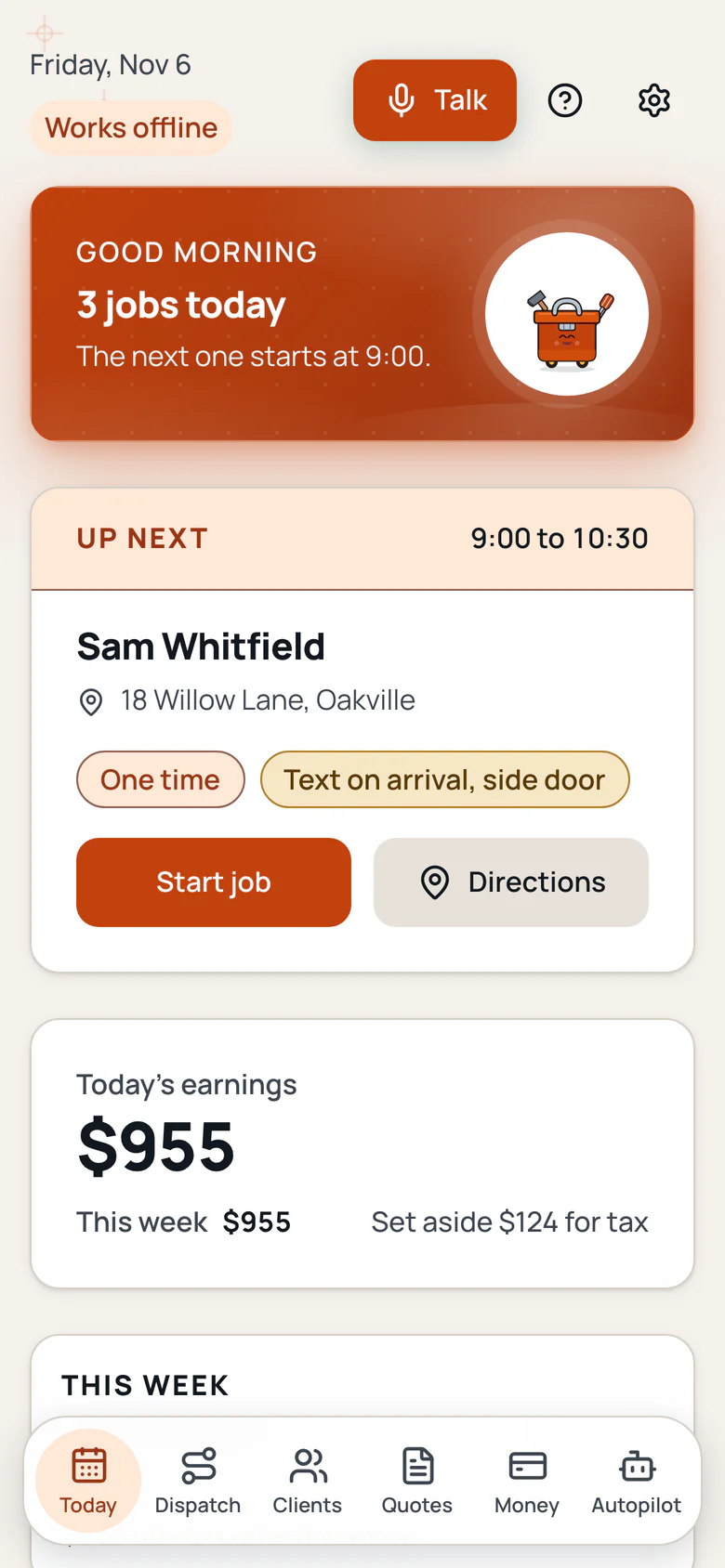
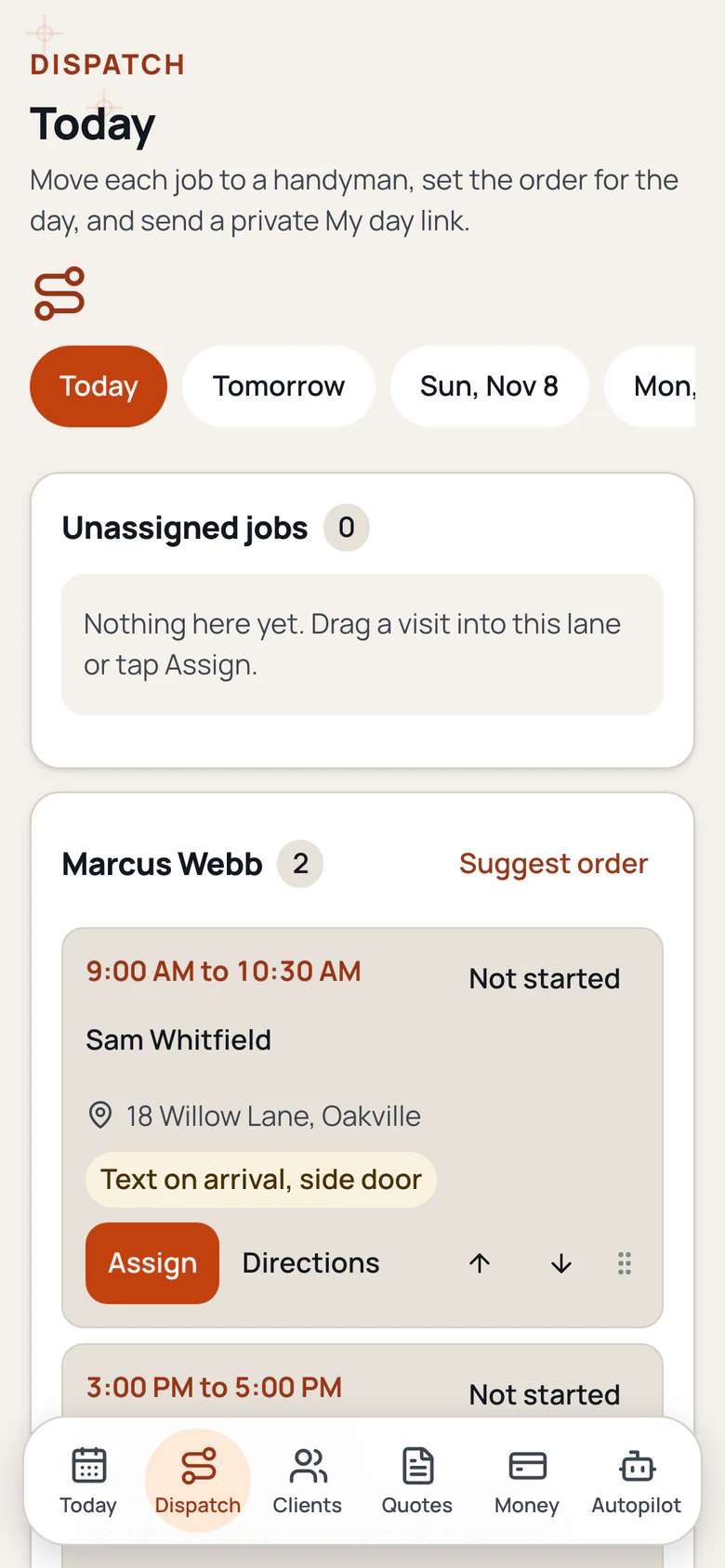
Handyman Made Easy screens.
The today, quote, dispatch and money screens from the app, each in a full phone frame. Swipe to see every screen.
Screen 1 of 4